
Automate
Shorten your engineering and design processes from several weeks to just a few days or even a few minutes and gain back your valuable time for new projects. The same advances that have enabled German Mechanical and Plant Engineering to establish itself as a global leader are also possible in the development and design departments, especially in the area of Electrical Engineering: Software controlling software – or a step toward Industry 4.0 using the WSCAD SUITE and the Add-on Automation Interface.
Consistent automation is achieved here on the basis of five sequential sub-steps that build on one another:
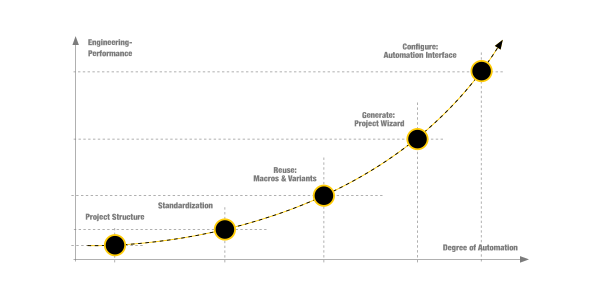
1. Project Structure

A consistent and well thought out structure of plants and equipment using structure identifiers from the outset simplifies and accelerates the development and design process immensely. Complete mechatronic parts lists can be generated fully automatically, and the matching of modules via ERP systems with the data from the mechanical CAD field can be quickly and conveniently accomplished. It is the marriage between electrical and mechanical engineering. The bridge to the electromechanical and thus mechatronic parts list is easy to implement by building small functions and functional units that match the mechanical modules on the one hand, while also being repeatedly usable any number of times on the other.
2. Standardise

The standardisation of the product portfolio aims to compose an individual offer from many reusable modules. Product structures and project templates are designed for the engineering process so that they not only reflect all the established norms and standards of the market, but also save the entire knowledge of the company and make it available to all developers. Clearly formulated internal and external policies for suppliers and partners further simplify the design process. This saves time and ensures the accuracy of all created documents. Together, these measures provide a solid foundation for the automation that is built on it.
3. Reuse

Frequently recurring subcircuits and schematic pages are stored as macros. With WSCAD Software, these functional modules can be efficiently defined across all disciplines: design a subcircuit, select it with a mouse-drawn window, assign a name, and save it as a macro. The macro can then be placed repeatedly in schematics as often as required.
To keep macro libraries structured and manageable, the use of variables is recommended. Variable changes are applied instantly across all schematic pages, disciplines, and documents. This ensures consistency, transparency, and eliminates the risk of omissions.
4. Generate

Those who want to take the next step can generate schematics using the Project Wizard. Just press a button and the small add-on to the WSCAD Software composes macros and variants for more or less complete schematics, including documentation – ideally up to 100 percent. Weeks of design work are thus reduced to a few days or possibly just a few hours.
5. Configure

The Automation Interface goes one step further: numerous product configurators such as SAP, ACATEC, Siemens Teamcenter, or proprietary systems can transfer all data required for the engineering process to the WSCAD software at the push of a button.
Complete schematics and all related documentation are then generated automatically. The entire workflow runs as a background process – the WSCAD software does not need to be opened, and no user interaction is required during schematic generation.
Schematics generated overnight, engineering controlled by software – a clear step towards Industry 4.0 in electrical engineering. In other words: configuring instead of designing. What previously took weeks can now be completed in minutes, freeing engineers to focus on higher-value tasks.
Several benefits go hand in hand with a consistently conceived and implemented standardisation and automation. Take advantage of our knowledge in conjunction with best practices. We can help you to determine and establish the optimum level of automation for your requirements.
The advantages at a glance
- Consistent look and feel for all schematics and documents, regardless of the designer
- Centrally stored engineering expertise for all developers
- Rapid development and design cycles
- Consistently high quality of work results
- Uniform templates and document structures
- Clearly defined master data
- Binding policies, both internal and external, for suppliers and partners
What we can do for you
- Record and analyze the current situation
- What can be standardised? And where?
- Optimal organisation and use of macros and macro variants
- Generating schematics at your fingertips with the Project Wizard
- Configuring instead of designing with the WSCAD Automation Interface
- Actionable recommendations and support for the implementation of the identified opportunities


