

Project Wizard
The Add-On Project Wizard is your intelligent design assistant. It automatically generates professional schematics, control cabinet layouts and diagrams for you in record time. Think of it as a generator that uses reusable design blocks (macros) to create your projects quickly and consistently.
Why You Will Appreciate Project Wizard:
- Increase efficiency: Stop copying and pasting. Reuse existing drawings and standardised components (macros) to create new projects efficiently.
- Full flexibility: Adapt everything easily. Details within the macros such as Device Tags (BMK), function texts or part numbers can be viewed and edited conveniently in a clear table. Define individual values and integrate part data from your database with ease. Activate or deactivate parts of the schematic as required and remove elements you do not need. Configurations can also be imported from XML files.
- Save valuable time: Generate schematics and diagrams automatically. Create new pages simply by selecting the required macro. Significantly accelerate your documentation process.
- Ensure consistency and improve quality: Ensure that all designs are standardised and uniform. Improve the quality of your project documentation.
- Build your own library: Save your configurations and macros so they can be reused across different projects.
In short, Project Wizard makes electrical design faster, easier and more consistent.
Application and Benefits:
With the Project Wizard add-on, schematics and diagrams for all disciplines such as Electrical Engineering can be generated automatically. XML files created by an external application can also be imported. The prerequisite is that these files comply with the WSCAD structure. This significantly accelerates documentation creation and noticeably improves document quality.
Functions:
- Automatic generation of schematics and diagrams
- Tabular editing of all project parameters
- Simple generation of documentation by activating and deactivating individual macros (functions) within a master project
- Saving system configurations as macro sets in WSCAD and as XML files (.xml)
- XML import of system configurations
Available For:
The add-on can be used together with the WSCAD software products Professional, Installation, BA Control, BA Project and Ultimate.

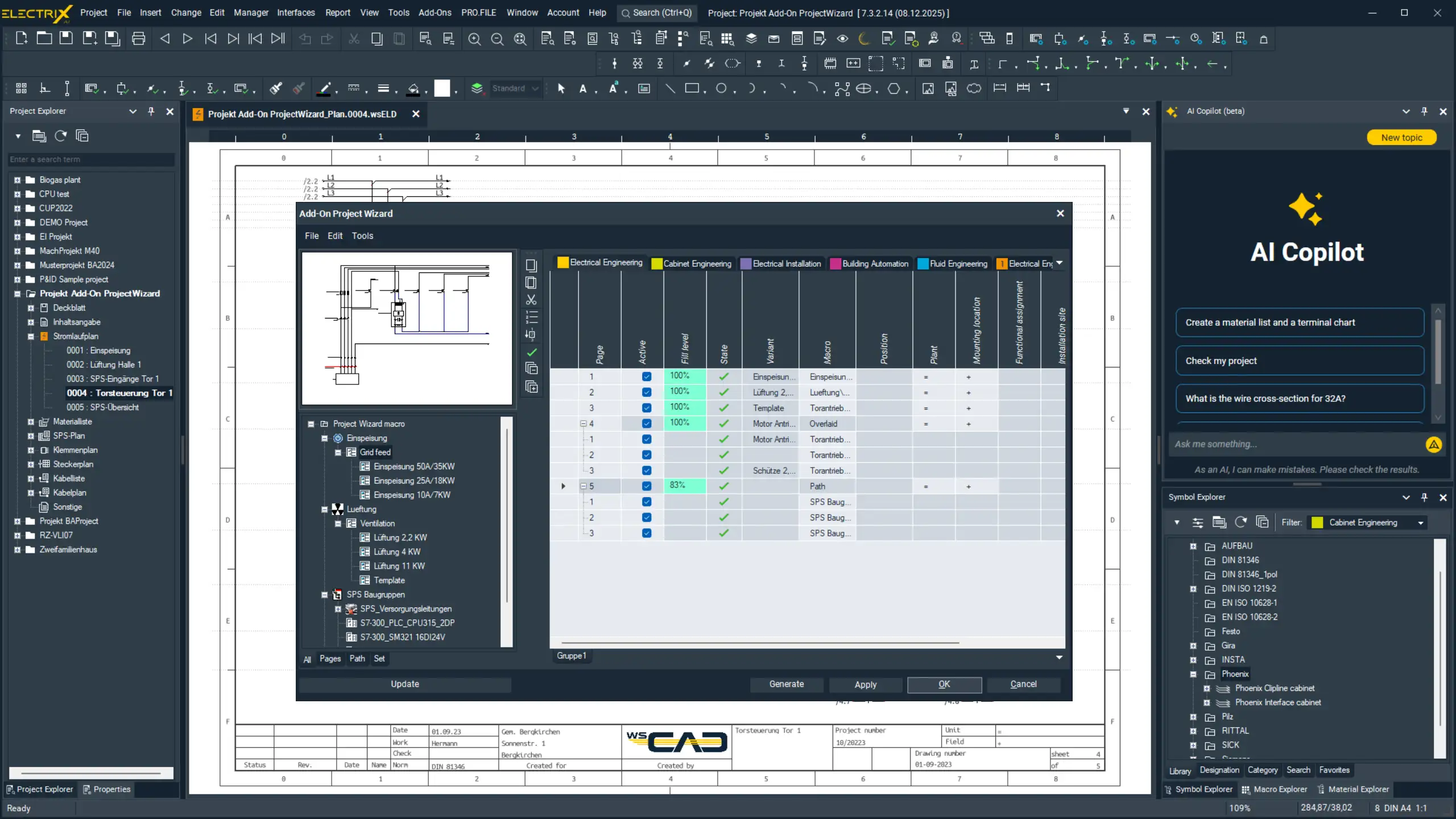
Extended Project Wizard with New Versions for Every Requirement
Project Wizard is now available in two different versions: Lite and the established Expert version. This provides even greater flexibility for project generation. Project Wizard Lite is available free of charge for ELECTRIX customers with a valid subscription licence or active maintenance agreement.
Your Benefits:
- Fully Automated Project Generation
With Project Wizard, complete projects can be generated at the push of a button based on macros. This saves valuable time and significantly reduces the effort required for project initialisation. - The Right Version for Every User:
- Project Wizard Lite: Free of charge for ELECTRIX customers with a valid subscription or maintenance agreement. This version provides the essential Project Wizard functions and enables fast and simple project generation.
- Project Wizard Expert: For experts who require maximum flexibility and extended functionality, the Expert version remains the ideal solution for complex and demanding projects.
- Accessibility for All Customers: The free Lite version allows ELECTRIX customers to benefit from automated project generation without additional costs. This ensures that your software always delivers maximum value.
These new Project Wizard versions enable optimised and application-specific project generation tailored to both new and advanced users.
Functions
Maximum number of macros per generation
Custom variables
Counter variables (e.g. )
Variable fill status
Position-based macro placement
Available page space
Working with sets
XML import/export
Save column configuration
Project Wizard Lite
10
Project Wizard Expert
Unlimited
With a valid subscription or maintenance agreement, the Lite version of Project Wizard is available free of charge.
Project Wizard Lite
Discover WSCAD Project Wizard Lite: Your Smart Start for Every Project
Already using WSCAD and looking to make project start-up even more efficient? Project Wizard Lite is your first step towards automatically generated schematics without requiring the full functionality of Project Wizard Expert.
Your Benefits at a Glance:
- Automated generation of schematics: Using macros, Project Wizard Lite can generate schematic pages in record time.
- Intuitive operation: Thanks to a clear and user-friendly interface, productive work can begin immediately.
- Increased efficiency: Avoid manual errors and focus on the tasks that really matter within your project.
These new Project Wizard versions enable optimised and application-specific project generation tailored to both new and advanced users.
Requirements for Project Wizard Lite:
- Active ELECTRIX licence (from version 7.3) in the editions Installation, Advanced, Professional, Ultimate, BA Control, BA Project, Standalone Fluid, Standalone PID, Standalone CE Expert or Education
- Active maintenance agreement or software subscription license
- You are not currently using the extended Project Wizard (function number 901) and are ready for a smart increase in efficiency
Project Wizard Expert
Maximum Control and Flexibility for Project Generation with ELECTRIX
Do you want to accelerate project start-up while maintaining full control over content, placement and automation? Then Project Wizard Expert is the ideal solution.
This powerful extension is intended for users who require more than efficiency alone. It provides precision, scalability and adaptability at the highest level.
Your Benefits with Project Wizard Expert:
- Unlimited macros per project: Create even complex projects in a single step without limitations.
- Targeted macro placement: Define precisely where macros are inserted for maximum layout control.
- Missing variable detection: Receive notifications indicating which macros still require variables to be completed.
- Available page space at a glance: The percentage indicator shows when the available page space for additional macros has been exhausted.
- Working with sets: Group macros across multiple pages into logical sets for structured and reusable project modules.
- Import and export via XML: Exchange project configurations efficiently between projects or teams.
- Custom column configuration: Save preferred table settings for recurring tasks.
Project Wizard Expert provides a highly configurable tool particularly suited to large projects, standardised processes and advanced users.
Who Is Project Wizard Expert Intended For?
For power users and companies with standardised engineering processes who want to increase productivity and quality equally through automation.
Requirements for Project Wizard Expert:
- Active ELECTRIX licence in the editions Installation, Advanced, Professional, Ultimate, BA Control, BA Project, Standalone Fluid, Standalone PID, Standalone CE Expert or Education
- Active maintenance agreement or software subscription license
Would you like a licence for the latest version of WSCAD ELECTRIX or would you like to add the Project Wizard Expert add-on to your existing licence?
Contact us today for personal consultation or request additional information. Our team will be pleased to assist you.

